Gesture Works Hand Gesture Control
Real-time hand gesture recognition system using machine learning to control a ball on screen. Train custom gestures with TensorFlow.js and MediaPipe for low-latency detection and interactive gameplay.
Project Overview
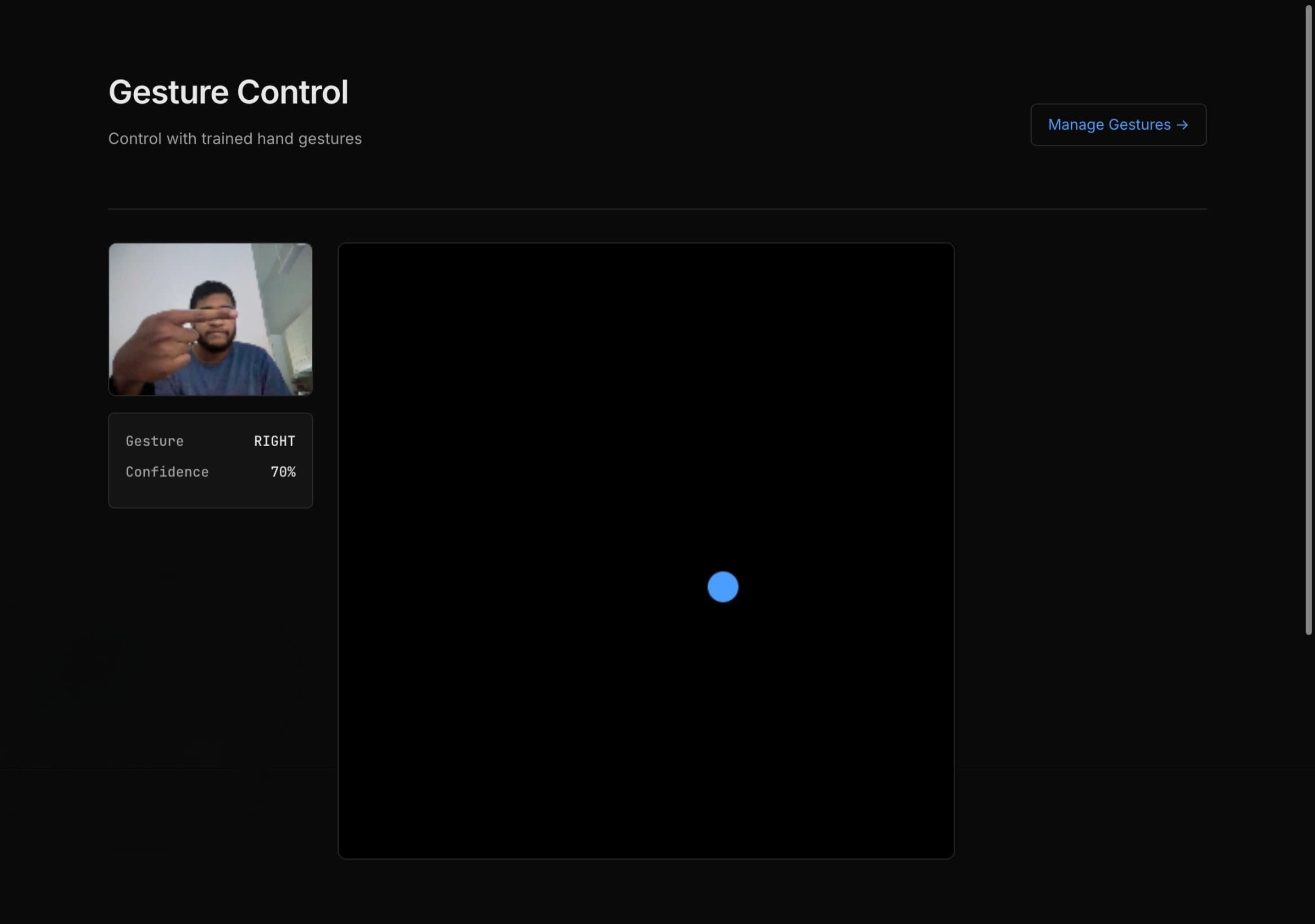
Gesture Works is an interactive machine learning project that demonstrates real-time hand gesture recognition using TensorFlow.js and MediaPipe. The application allows users to train custom gestures (UP, DOWN, LEFT, RIGHT, FREEZE) and use them to control a ball on the screen, showcasing the power of in-browser machine learning with low latency detection.
Key Features
Custom Gesture Training
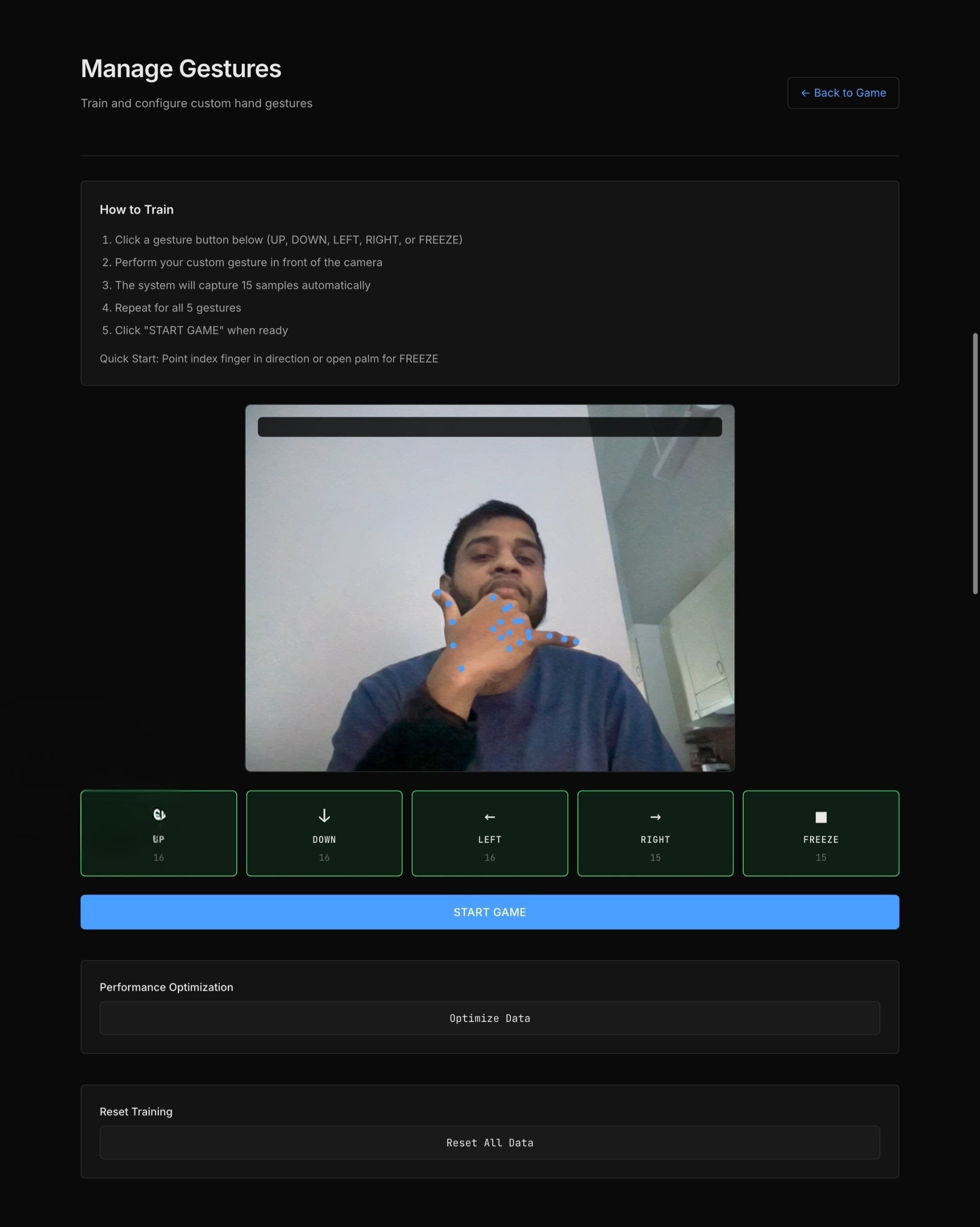
Train your own hand gestures with an intuitive interface. Capture multiple samples for each gesture direction to build a robust model.
Real-Time Detection
Experience low-latency hand tracking and gesture recognition powered by MediaPipe and TensorFlow.js running entirely in the browser.
Interactive Gameplay
Control a ball on screen using your trained gestures. Move it up, down, left, right, or freeze it in place with hand movements.
Gesture Management
View and manage your trained gestures with a dedicated management interface. Clear individual gestures or retrain as needed.
Data Persistence
Auto-save training data to localStorage and server. Training data persists across sessions for seamless user experience.
Performance Optimized
10fps video processing, 400ms prediction throttle, model warm-up with WebGL shader pre-compilation for smooth real-time performance.
ML Model Architecture
Feature Extraction
- •21 hand landmarks (x, y, z coordinates) = 63 base features
- •Enhanced with directional angles (sin/cos components)
- •Displacement vectors from palm center
- •Total: ~80 features per sample
Neural Network
Training: 30 epochs, Adam optimizer
Performance Optimizations
- Model warm-up with 3 dummy predictions (WebGL shader compilation)
- Prediction throttle: 400ms (2.5 predictions/sec)
- Video rendering: 10fps (every 6th frame)
- Confidence threshold: 0.3 (30%)
Usage Guide
Playing the Game
- 1.Visit the homepage - the game loads immediately
- 2.Use your trained gestures to control the ball:
- • UP (↑): Move ball upward
- • DOWN (↓): Move ball downward
- • LEFT (←): Move ball left
- • RIGHT (→): Move ball right
- • FREEZE (■): Stop ball movement
- 3.Ball wraps around screen edges
Training Custom Gestures
- 1.Navigate to /manage or click "Manage Gestures" in the header
- 2.Click a gesture button (UP, DOWN, LEFT, RIGHT, or FREEZE)
- 3.Perform your custom gesture in front of the camera
- 4.System captures 15 samples automatically
- 5.Repeat for all 5 gestures
- 6.Training data auto-saves to both localStorage and server
Quick Start Gestures:
• Point index finger in direction for UP/DOWN/LEFT/RIGHT
• Open palm (all fingers) for FREEZE
Managing Training Data
- •Optimize Data: Reduces training samples from 30 to 15 per gesture for better performance
- •Reset Training: Deletes all training data to start fresh
Technical Stack
Frontend
- Next.js 16 (App Router)
- React 19
- TypeScript
- CSS (Custom Properties)
Machine Learning
- TensorFlow.js
- MediaPipe Hand Landmarker
- Neural Network
Runtime & Deployment
- Bun (Node.js compatible)
- Vercel
- Browser-based
How It Works
Hand Tracking
MediaPipe Hands detects and tracks 21 hand landmarks in real-time, providing precise 3D coordinates for each finger joint and palm position.
Gesture Training
Users capture multiple samples of each gesture (UP, DOWN, LEFT, RIGHT, FREEZE). The system stores the landmark coordinates for each sample, building a training dataset.
Classification
TensorFlow.js uses a K-Nearest Neighbors (KNN) classifier to match live hand positions against the trained gestures, providing instant classification with high accuracy.
Ball Control
Detected gestures translate into ball movement on the canvas. The system updates the ball's position in real-time based on the recognized gesture direction.
Challenges & Solutions
Performance Optimization
Challenge: Maintaining 60fps while running hand tracking and gesture classification simultaneously.
Solution: Optimized the model inference pipeline, reduced unnecessary re-renders, and used efficient data structures for landmark processing. The KNN classifier provides fast predictions without heavy computation.
Gesture Accuracy
Challenge: Distinguishing between similar gestures and handling variations in hand positions.
Solution: Implemented multiple training samples per gesture and normalized landmark coordinates. Users can retrain gestures to improve accuracy for their specific hand movements.
Cross-Browser Compatibility
Challenge: Ensuring webcam access and WebGL support across different browsers.
Solution: Implemented proper error handling and fallbacks. Used modern browser APIs with progressive enhancement and clear error messages for unsupported browsers.
Browser Compatibility & Troubleshooting
Browser Support
Chrome/Edge
Full support (recommended)
Firefox
Full support
Safari
Requires WASM polyfill
Requirements:
- • WebGL 2.0 support
- • Camera access permission
- • Modern ES6+ JavaScript support
Camera Not Working
- • Grant camera permissions in browser settings
- • Check if another app is using the camera
- • Try Chrome/Edge for best compatibility
Gestures Not Recognized
- • Ensure all 5 gestures are trained (15 samples each)
- • Check camera has good lighting
- • Position hand clearly in frame
- • Try retraining gestures with exaggerated movements
Performance Issues
- • Click "Optimize Data" in /manage
- • Close other browser tabs
- • Check GPU acceleration is enabled in browser
- • Clear browser cache and reload
Installation & Development
Installation
# Clone the repository
git clone https://github.com/Is116/gesture-works.git
cd gesture-works

# Install dependencies
bun install

# Run development server
bun run dev
Open http://localhost:3000 in your browser.
Development Commands
bun run devStart development serverbun run buildBuild for productionbun run startStart production serverbun run lintRun ESLintFuture Enhancements
More Complex Gestures
Add support for two-handed gestures and dynamic movement patterns for more sophisticated controls.
Game Modes
Implement various game modes like obstacle avoidance, target collection, and time challenges.
Gesture Persistence
Save trained gestures to local storage or cloud for persistence across sessions and devices.
Advanced ML Models
Explore neural network-based classifiers for improved accuracy and support for complex gesture sequences.
Try It Yourself
Experience the power of hand gesture control in your browser. Train your own gestures and start playing!
View on GitHub